
Shopify Shop Campaigns: How a New Store Went From Zero Sales to 38 Orders in 4 Weeks

A real Shopify case study and how-to guide. Learn how Shop Campaigns and the Shop app took a new US store from nine weeks of zero sales to 38 orders and $3,497 in four weeks, why Shopify analytics hid those sales, and how to set up your own campaign.
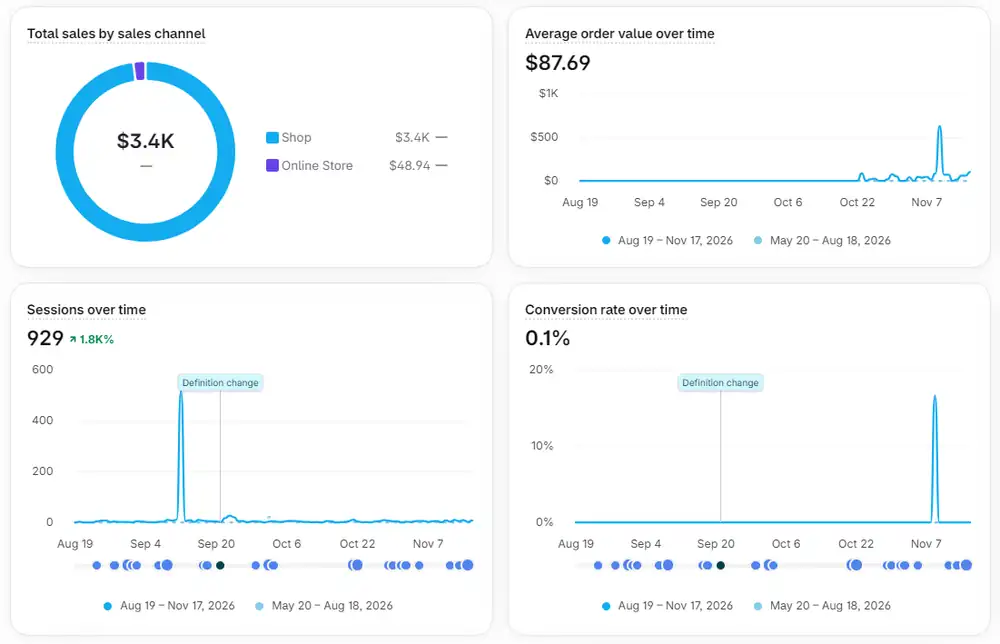
Real screenshots from the store's Shopify analytics
Project visuals
Project Gallery
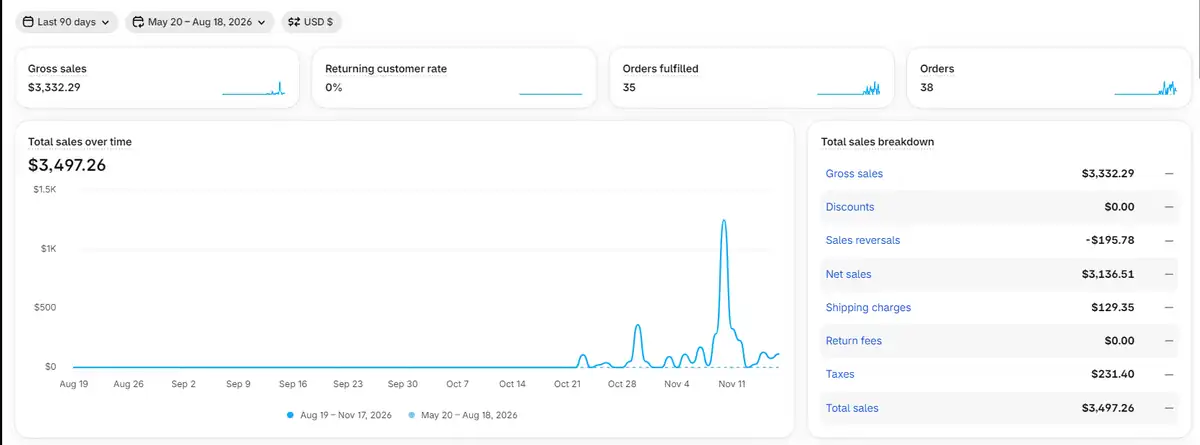
Shopify Shop Campaigns promote your products inside the Shop app with a Shop Cash offer for new customers, and you set the maximum you are willing to pay to acquire each customer. In one anonymised UBE client case, a US home and outdoor Shopify store with nine weeks of zero sales took 38 orders worth $3,497.26 in about four weeks after launching a Shop Campaign, and 37 of the 38 orders were placed inside the Shop app. Because those orders happen in the app, Shopify analytics shows them with no website referrer and a very low conversion rate, so judge the campaign by the sales channel and order tags.
Table of Contents
What are Shopify Shop Campaigns and how does the Shop app work?
The Shop app is Shopify's shopping app, where buyers browse products from Shopify stores, track orders and check out with Shop Pay. Shopify says the app has more than 100 million users. Shop Campaigns are Shopify's built-in way to advertise to those shoppers: your products and an offer are shown in places such as the Shop app home feed, the offers feed, push notifications and emails.
The offer is usually Shop Cash, a reward that new customers earn on their first purchase from your store. Instead of paying per click, you set a daily budget and the average acquisition cost you are willing to pay for a new customer, so the campaign is built around new customer acquisition rather than traffic. Orders placed within 7 days of a click are attributed to the campaign.
For the official details, see Shopify's guide to creating and managing Shop Campaigns and its overview of how Shop Campaigns work. Availability depends on your country and Shopify Payments support, so check the Shop channel in your own admin.
Case study: how a new Shopify store went from zero sales to 38 orders
This is a real UBE client: a US-based Shopify store selling outdoor, camping and home essentials. At the client's request we do not publish the store name, web address or any customer details. Every number below comes from the store's own Shopify analytics and order records.
The store was live, stocked and ready, yet it recorded zero orders for nine straight weeks from mid-August to mid-October 2026. Once the Shop Campaign went live, orders started the same week. In about four weeks (October 23 to November 17, 2026) the results looked like this:
| Metric | Result |
|---|---|
| Total sales | $3,497.26 |
| Orders | 38 (35 fulfilled) |
| Average order value | $87.69 |
| Largest single order | $1,228.14 |
| Orders placed in the Shop app | 37 of 38 (97%) |
| Orders from the Shop Campaign | 34 of 38 (89%) |
| New customers acquired | 38 (100% first-time buyers) |
| US states reached | 25 |
| Time to results | About 4 weeks |
The complete breakdown, including the analytics screenshots, is on our Shopify Shop Campaigns case study page in the Work section.
Where the orders came from: the Shop app vs social media traffic
Before the campaign, the usual traffic sources were not moving the needle. Social media sent about 57 sessions in total from Facebook, Instagram, Pinterest, TikTok and X, and none of them turned into a sale. A one-day spike of around 500 sessions in September also produced no orders. The store did not need more visitors; it needed buyers who were already in a shopping mindset.
We checked every order in the store backend: the sales channel, the app that created it, the referrer and UTM data, and the tags Shopify attached. The answer was clear. Almost every order was placed inside the Shop app, most of them through the Shop Campaign.
In total, 100% of the store's orders trace back to Shopify's Shop ecosystem, and about $3,450 of the $3,497 in sales was placed inside the Shop app itself.
| Source | Orders | Share | What it means |
|---|---|---|---|
| Shop app, via Shop Campaign | 34 | 89% | Tagged by Shopify as New campaign, New customers and Shop Cash offers acquired |
| Shop app, organic | 3 | 8% | Shoppers who found the store inside the Shop app without the offer |
| Online store (via shop.com and Shop Pay) | 1 | 3% | Even this order started on shop.com |
| Facebook, Instagram, Google, other ads | 0 | 0% | No order carried a social or ad referrer or UTM tag |
Why Shopify analytics shows a low conversion rate and "None" referrer for Shop app sales
If you run a Shop Campaign and open your Shopify analytics, the numbers can look alarming. In this case the dashboard showed a 0.1% conversion rate and None as the referrer for almost every sale. It looked like a store that was not converting.
The store was converting well. Shop app orders are placed inside the app, not on your website, so they never appear as website sessions and they arrive without a website referrer. The Total sales by sales channel report showed the truth: about $3.4K from the Shop channel against $48.94 from the online store.
To measure Shop Campaigns correctly, filter orders by the sales channel field and by Shopify's campaign tags (New campaign, New customers, Shop Cash offers acquired), and check the Advertising page in the Shop channel. For a wider measurement setup, see our guide on how to track website performance and results.
A low website conversion rate and a None referrer are normal for Shop app sales. Judge the campaign by orders, sales channel and new customers acquired, not by website sessions.
Week-by-week sales growth after the Shop Campaign launched
Orders started in the first week and grew almost every week after that. The best week (November 9) included the store's biggest sale, a $1,228 portable power station with a solar panel, also placed through the Shop Campaign. That one order shows the channel can deliver high-ticket buyers, not only small impulse purchases. Without it, the other 37 orders still average about $61 each.
| Week starting | Orders | Total sales |
|---|---|---|
| Aug 17 to Oct 12 (9 weeks) | 0 | $0 |
| Oct 19 | 2 | $128.85 |
| Oct 26 | 9 | $500.66 |
| Nov 2 | 10 | $430.45 |
| Nov 9 | 15 | $2,245.53 |
| Nov 16 (first 2 days only) | 2 | $191.77 |
How to set up a Shop Campaign for a new Shopify store
1. Get the store ready first. Shop Campaigns send buyers to your products, so product titles, photos, prices, shipping rates and policies need to be complete. A store that is not ready will waste budget. If you are still launching, our Shopify store setup services cover the build, and our Shopify store setup cost guide explains the budget.
2. Add the Shop channel. In your Shopify admin, add the Shop sales channel and confirm your store appears correctly in the Shop app. You need to be the store owner or have Shop channel and Marketing permissions.
3. Create the campaign. In the Shop channel, open Marketing and create a campaign. Set a campaign name, a daily budget, the acquisition cost you are willing to pay per new customer and a target order value. These settings work together, so changing one may mean adjusting the other. Shopify's own guidance warns against setting the acquisition cost too low.
4. Wait for the audience to build. A new store can show a Pending status for up to 24 hours while Shopify builds its audience. This happens once.
5. Measure the right numbers. Track orders by sales channel and campaign tag, compare the acquisition cost with your product margin, and remember the 7-day attribution window means charges can continue for a few days after you pause.
When Shop Campaigns are worth it (and when they are not)
Shop Campaigns fit best when you need first-time buyers and you know what a new customer is worth to you. Because you set the acquisition cost, you can compare it directly with your margin. In this case, every one of the 38 buyers was new, which is exactly what the channel is built for.
They work well for stores with a broad catalog. Here, sales came from six categories: portable power and solar, storage and organization, camping gear, fishing electronics and tackle, kitchen and home, and home fitness. That spread means growth did not depend on one bestseller. Many Shopify dropshipping stores have exactly this kind of wide catalog.
They are a weaker fit if your margins cannot cover the acquisition cost, if fulfillment is slow or unreliable, or if your product pages are incomplete. Shop Campaigns also do not replace a brand: they bring the first order, but repeat sales still depend on the product, delivery and follow-up.
If your store gets traffic but no sales, start by fixing the store itself. Our guide on why visitors leave without buying walks through the most common causes.
What to do after the first sales: repeat buyers and a second channel
Turn first-time buyers into repeat buyers. All 38 customers in this case were new, so the returning customer rate was 0%. Follow-up emails, Shop app follows and a second-order offer are the next lever.
Keep scaling what works. Increase the Shop Campaign budget gradually while it keeps acquiring new customers at a cost your margin can carry.
Build a second channel. Social traffic was not converting yet, so retargeting past buyers and lookalike audiences can add a source that does not depend on one platform. Our guide to getting more store traffic covers the options.
Push the proven winners. Feature the best sellers (in this case power stations, storage totes and cutting boards) on the homepage and in campaign creatives.
Get help launching and managing Shop Campaigns
Unified Branding Experts (UBE) builds and manages Shopify stores for US small businesses, including Shop Campaigns, catalog merchandising and sales reporting. Our ecommerce store management services cover ongoing campaign and store work, and the store management packages list what each plan includes.
Launching a new store? Compare our dropshipping store setup offer, the ecommerce growth packages or the small business marketing packages that combine website improvements, SEO and AI search, and social media. You can also read the full Shopify Shop Campaigns case study.
Want Shop Campaigns managed for your store?
UBE sets up, runs and reports on Shop Campaigns as part of Shopify store management.
Ecommerce store management packages
Compare our transparent tiers with full deliverables, timelines, and 100% ownership.
Frequently Asked Questions
What is a Shopify Shop Campaign?
A Shop Campaign is Shopify's built-in advertising for the Shop app. It shows your products and a Shop Cash offer to shoppers in places like the Shop app home feed, offers feed, notifications and emails, and it is designed to acquire new customers.
How much do Shopify Shop Campaigns cost?
You set a daily budget and the average acquisition cost you are willing to pay for each new customer, so you control the spend. The right figure depends on your margin and average order value. Shopify warns against setting the acquisition cost too low.
Why do Shop app orders show None as the referrer in Shopify analytics?
Shop app orders are placed inside the app, not on your website, so they never create a website session and arrive without a website referrer. Use the sales channel report and Shopify's campaign order tags to measure them.
Can a brand new Shopify store use Shop Campaigns?
Yes, if the store is eligible in its country and the Shop channel is set up. In our case study, a store with nine weeks of zero sales took its first orders in the same week the Shop Campaign went live.
Do Shop Campaigns work for Shopify dropshipping stores?
They can, as long as product pages, shipping times and policies are solid and your margin covers the acquisition cost. A wide catalog helps, because sales can come from many products instead of one.
Why is my Shopify store getting traffic but no sales?
Usually because the visitors are not ready to buy or the store has gaps in trust, pricing, shipping or product information. In this case study, about 57 social media sessions and a 500-session spike produced no orders, while the Shop app brought buyers who were already shopping.
How do I know which orders came from a Shop Campaign?
Check the order's sales channel and tags. Shopify tags campaign customers with labels such as New campaign, New customers and Shop Cash offers acquired, and the Shop channel's Advertising page shows campaign results.
Can Unified Branding Experts manage Shop Campaigns for my store?
Yes. UBE sets up and manages Shop Campaigns as part of Shopify store management for US businesses, together with catalog work, reporting and repeat-buyer follow-up.
Unified Branding Experts Editorial & Strategy Team
Unified Branding Experts is a full service digital branding, technology, and growth agency. We combine brand identity, full stack Next.js, high velocity eCommerce, and AI Search Optimization into one connected scaling system.
Related Insights & Strategy Guides
View All Articles →Shopify Store Setup Cost in 2026: Everything You Need Before Launch
Shopify store setup costs explained: UBE setup starts at $399. Budget separately for platform subscriptions, themes, apps, domains and payment fees.
How to Get More Traffic to Your Website or Online Store
Build a useful traffic plan for your website or store. Learn which search, content, shopping, email and paid channels fit your customers and how to measure them.
Why Visitors Leave Without Buying or Contacting You
Diagnose why visitors leave your website or store without purchasing or inquiring. Check intent, trust, mobile usability, checkout, forms and measurement in order.
How to Track Website Performance and Measure Results
Use Search Console, GA4 and a small lead or order dashboard to understand discovery, engagement, conversions, speed and what to improve next.